Code it. Run it. Test it.
The secure AI infrastructure layer that lets AI tap, type, swipe, and debug iOS apps from anywhere.that lets your AI (or you) tap, type, swipe, and debug a real iOS app from anywhere. It operates across the entire developer lifecycle.
Works on any React Native app — no testIDs, no SDK, no app changes.
Any React Native app. No testIDs. No SDK.
npm install -g @metroremote/cliWorks with Claude, Cursor, and Codex. Any bare React Native or Expo bare workflow project. No Mac? Cloud builds launch with Pro as a paid add-on (from $2/build).
$ npm install -g @metroremote/cli
✓ Installed
$ metro-remote setup
✓ Project detected
✓ System requirements met
✓ Logged in via GitHub
✓ Tunnel provisioned
✓ App patched
Scan QR code with the Metro Remote app on iPhone (auto-imports and toggles ON)
Clean build in Xcode (Cmd+Shift+K, Cmd+R)
✓ Setup complete!
$ metro-remote start
✓ Tunnel active
✓ Device connected
✓ Metro running
Metro Remote is running!
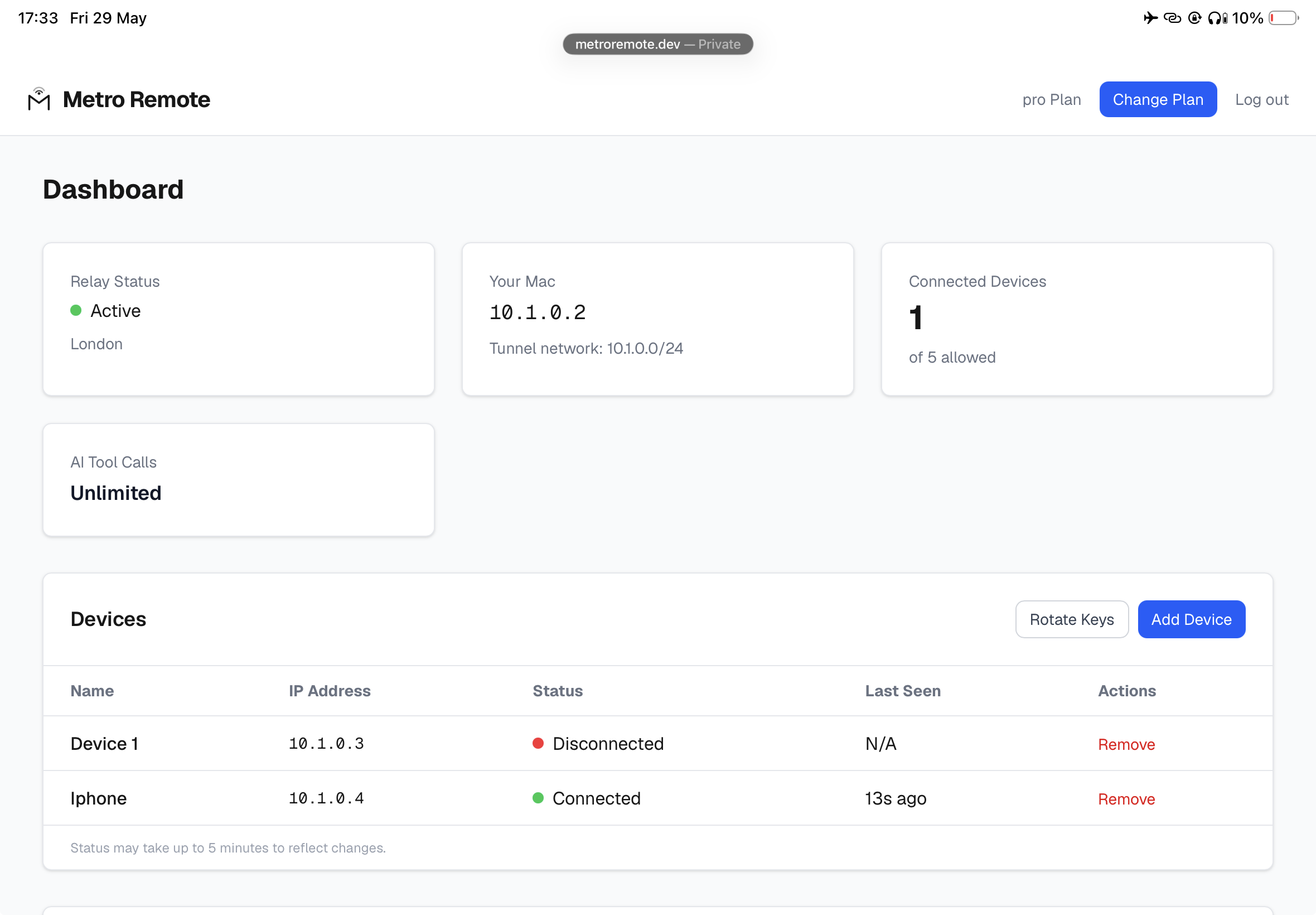
Manage tunnels, devices, and billing in one place.
Real-time relay status, connected devices, AI tool calls. Rotate keys, add devices, change plans in seconds.

Give Your AI Hands and Eyes on a Real iPhone
Tap, scroll, type, and debug your app on a real iPhone. Your AI drives it — you watch. Works on any React Native app with zero instrumentation: no testIDs, no SDK, no app changes.
> "Test the login flow and verify the dashboard loads"
metro_remote_run [8 steps]
✓ tap "Sign In" - Screen: Login
✓ type "user@example.com" - Email field
✓ type "password" - Password field
✓ tap "Login" - Screen: Dashboard (1.8s)
✓ scroll down - 500px
✓ tap "Profile" - Screen: Profile
✓ elements - 47 found
✓ wireframe - screen layout mapped
Run completed (8 steps, 3.4s)
27
AI tools built in
200
Actions per batch call
0
Config required
Works with Claude, Cursor, and Codex.
The Problem
Without Metro Remote
- Metro only works on same WiFi or USB cable
- Coffee shop? Hotel? Corporate firewall? Development stops.
- Xcode builds require USB to deploy
- Source code and dev logs sent as plain HTTP - anyone on your WiFi can read them
- React Native 0.77+ removed console.log from your terminal
- Your AI writes code but can't see or test your app on the device
With Metro Remote
- ✓ Hot reload from anywhere - no cable, no same WiFi, even over 5G
- ✓ Works through corporate firewalls, hotel WiFi, any network
- ✓ Native Xcode rebuilds, installed to your phone over the tunnel Beta
- ✓ Encrypted in transit — we don't read, log, or inspect your traffic
- ✓ Console logs stream to your terminal in real-time - fixes RN 0.77+
- ✓ Your AI can tap, swipe, type, and debug your app on the real device
- ✓ Works with any React Native project - if hot reload works locally, it works remotely
How It Works
Your Mac
Metro bundler
Encrypted Relay
Secure connection
Your iPhone
Real device
Only dev traffic goes through the encrypted relay. Everything else on your phone goes direct - browsing, apps, streaming are untouched.
Three Products in One
To our knowledge, each one solves a problem nothing else can. You get all three.
Remote Hot Reload
Metro hot reload through an encrypted tunnel. Change a .tsx file, see it on your phone in ~100ms. From anywhere.
~95% of your development time
AI Device Automation
Your AI can tap, swipe, type, and debug your app on a real device. 27 tools for Claude, Cursor, and Codex. Zero app changes needed.
To our knowledge, nothing else does this
OTA App Deploy
Build, sign, and deploy your app to any tester's iPhone over the air. No TestFlight, no cables, no Apple review queue. One command.
Skip TestFlight entirely
React Native Killed console.log
We Brought It Back.
React Native 0.77+ removed console.log from your Metro terminal. Metro Remote restores it automatically -streamed to your Mac in real-time, even over 5G.
LOG App started -connecting to API...
LOG Auth token valid, user authenticated
WARN Deprecated prop "onPress" in Button.tsx:42
LOG Fetching /api/projects -200 OK (34ms)
ERR TypeError: Cannot read property "name" of undefined
LOG > at ProjectList.tsx:18
LOG Retrying with fallback data...
Works on React Native 0.77+. Zero code changes needed.
Deploy to Testers in Seconds Beta
One command builds your app, signs it, and sends an install link to any iPhone. No TestFlight wait. No USB cable. No App Store review.
30+ min
TestFlight (build + review + install)
seconds
Metro Remote (cached builds)
$ metro-remote deploy --ota
✓ Building with xcodebuild...
✓ Build succeeded
✓ IPA packaged
✓ Uploaded to deploy server
Install link: https://metroremote.dev/deploy/abc123
Link expires in 30 minutes
Build
Full xcodebuild archive on your Mac
Package
Dev-signed IPA, ready to install
Install
Tester taps a link, app installs OTA
Add Any Tester's iPhone in 30 Seconds Beta
No cables. No asking testers for their UDID. One QR code does everything.
📲
Scan
Tester opens a link on their iPhone
🔑
Collect
Device ID collected automatically
✅
Register
Auto-registered with Apple Developer
🚀
Deploy
App builds and installs automatically
One command: metro-remote invite
8 Things Nothing Else Can Do
To our knowledge, Metro Remote is the only tool that does all of these.
Native Builds, Delivered Over Cellular
Build natively on your Mac, then install to your phone over cellular — the rebuilt app rides the tunnel. Change Swift code, add CocoaPods. (No Mac? Cloud builds launch with Pro as a $2/build paid add-on.)
AI Taps, Swipes, and Tests
Your AI can interact with your running app on a real device. 27 tools for Claude, Cursor, and Codex. Zero app changes needed.
Console Logs Restored
React Native 0.77+ removed console.log from your terminal. Metro Remote brings it back - streamed in real-time, even over 5G.
One Command Setup
metro-remote setup. That's it. Provisions your tunnel, patches your app, generates a QR code. Done in under 60 seconds.
Stays Connected
Switch from WiFi to cellular and back - your session usually stays alive across the transition. If hot reload stalls, shake to Reload.
Multi-Device Testing
Connect multiple iPhones and iPads simultaneously. Test on different screen sizes and OS versions at once.
Your Real Device
Not a simulator. Not a cloud VM. Your actual iPhone on your actual network. Find real-world bugs that emulators miss.
Switch Projects Instantly
cd to another project and run start. Tunnel stays up, Metro switches, no re-setup needed. Test multiple apps in one session.
The Full CLI
Everything you need. Nothing you don't.
Built For Real Developers
If you build React Native apps on iOS, this is for you.
💻
Solo Developers
Code from the couch, a cafe, or another room. Your phone doesn't need to be next to your Mac.
🌎
Remote Teams
Developers in different cities or countries. Test on real devices without shipping hardware around.
🏢
Agencies
Send ad-hoc builds to registered test devices without TestFlight. One command, one link, one tap to install.
🔒
Security-Conscious
Your source code is sent as plain HTTP by default. Metro Remote encrypts everything. Work safely on any network.
How We Compare
Built specifically for React Native remote development — to our knowledge, no competitor combines all of this.
| Feature | Metro Remote | Expo Tunnel | ngrok |
|---|---|---|---|
| AI Device Automation | 27 tools | × | × |
| 5G Hot Reload | ~100ms | Limited | Manual |
| Remote Xcode Builds (local Mac) | ✓ | × | × |
| Cloud Builds (no Mac, $2/build add-on) Coming | Add-on | × | × |
| OTA Deploy Beta | ✓ | × | × |
| Per-customer isolation | Per-tenant kernel isolation | Shared subdomain | Shared proxy |
| Survives WiFi-to-5G switch | Near-seamless | × | × |
| Multi-Device | ✓ | Limited | × |
| One-Command Setup | ✓ | Expo only | × |
| Doesn't slow your phone | ✓ | × | × |
More Secure Than Normal Metro
Every data flow is encrypted and authenticated. Tunnel traffic, API calls, deploys, login - all of it.
| Feature | Normal Metro | Metro Remote |
|---|---|---|
| Encryption | None (plain HTTP) | Encrypted in transit |
| Source visibility | Anyone on WiFi | Only you |
| Coffee shop risk | HIGH | Negligible |
| MITM attack | Possible | Prevented |
| Device auth | None | Cryptographic |
Encrypted in transit. We don't read, log, or inspect your traffic.
Web Dashboard
Manage your account, view deploy history, and upgrade your plan - all from the browser.
Account & Billing
View your plan, API keys, and subscription status. Upgrade or manage billing with one click.
Deploy History
See recent OTA deploys with status tracking - ready, downloading, installed, or expired. Share install links.
Device Management
Add and remove devices, view live connection status, and rotate tunnel keys with a new QR code.
GitHub Login
Sign in with GitHub OAuth. One click, no passwords.
Your Daily Workflow
Set up once. Then it's three steps every day.
Start + Toggle
Run metro-remote start on your Mac, toggle Metro Remote on your iPhone.
Code Normally
Write code, hot reload, run Xcode builds. Everything works exactly like it does on local WiFi.
Stop When Done
Run metro-remote stop or just close the terminal. That's it.
Works With Your Existing Project
Metro Remote doesn't change your code, your build system, or your workflow. It patches a small number of project files (AppDelegate, Podfile, index.js, Xcode env) and everything else stays exactly the same.
Bare React Native
Any version 0.70+
Expo Bare Workflow
Ejected / prebuild
CocoaPods
Native modules work
TypeScript / JS
Hot reload on both
Set Up Once. Works Until You Change It.
Install once with npm install -g @metroremote/cli, then run metro-remote setup. Scan a QR code, rebuild in Xcode once. After that, your tunnel config is saved on your Mac and your iPhone. There is nothing to re-configure, no tokens that expire, no sessions that time out.
<5min
One-time setup
1 tap
Daily reconnect
None
Daily maintenance
System Requirements
Mac (Development Machine)
- ✓ macOS 12+ (Monterey or later)
- ✓ Node.js 18+
- ✓ Xcode 15+ (for native builds)
- ✓ Tunnel tools (auto-installed)
iPhone (Test Device)
- ✓ iOS 15+ (iPhone 8 or later)
- ✓ Metro Remote app (free on App Store)
- ✓ WiFi or cellular connection
- ✓ Camera (to scan QR code once)
Frequently Asked Questions
Does this replace Expo?
No. Metro Remote works alongside Expo bare workflow (ejected/prebuild with an ios/ directory) or standalone React Native. It doesn't change how you build - it changes where you can build from. Note: Expo managed workflow (no ios/ directory) is not supported - use Expo's built-in dev client instead.
Is my source code sent through your servers?
Your traffic passes through an encrypted tunnel via our relay. Each connection is encrypted in transit with credentials unique to your account. The relay does not store, log, or inspect your traffic.
Does it work on Android?
Not yet - iOS only for now. Android support is on the roadmap.
What happens if my internet drops?
The tunnel handles network transitions smoothly. Switch from WiFi to cellular, walk out of range, reconnect - the tunnel usually picks up exactly where it left off. If hot reload stalls after a switch, shake your device and tap Reload.
How much bandwidth does it use?
Only Metro dev traffic goes through the tunnel. Normal phone usage (browsing, apps, streaming) goes direct. A typical hot reload is a few KB. Even a full Xcode build is only 50-100MB.
My app crashes on launch - what's going on?
Make sure Metro Remote is toggled ON on your iPhone before opening the app. Metro Remote patches your app to load the JavaScript bundle through an encrypted tunnel. If the tunnel is off, the app can't reach Metro and will crash. This is by design - your dev traffic only flows over a secure, encrypted connection. Just toggle Metro Remote on and reopen the app.
Can I deploy to a device that's never been connected to my Mac?
Yes. One command handles everything -device registration, provisioning, and deployment. The device doesn't need Xcode, a USB cable, or physical access to your Mac. It can be anywhere in the world on any network.
Does hot reload work over 5G / cellular?
Yes. The encrypted tunnel works over any connection: WiFi, 5G, LTE, even tethering. Edit code on your Mac, save, and the app updates on the iPhone instantly regardless of what network it's on. Switch from WiFi to 5G mid-session and the tunnel usually reconnects on its own — if hot reload stalls, shake the device and tap Reload. Logs stream back to your terminal in real-time over the encrypted tunnel too.
How does OTA deploy work? Beta
Run metro-remote deploy --ota and Metro Remote runs a full xcodebuild archive, signs the IPA with your certificate, uploads it to our server, and gives you an install link. Testers tap the link on their iPhone and the app installs instantly. No TestFlight, no cables, no Apple review. Links expire after 30 minutes for security. Beta: some apps with custom CocoaPods build scripts (Firebase, WebRTC, gRPC) may need a one-time build in Xcode before the first OTA deploy. After that, Metro Remote handles all subsequent builds automatically.
Do testers need to be on my WiFi?
No. OTA deploy links work from anywhere - testers just need an internet connection and their device UDID registered in your Apple Developer provisioning profile. They tap the link, the app installs. They can be on the other side of the world.
Is my source code safe?
Yes. Your code is encrypted in transit and we don't read, log, or inspect it. The tunnel rides through most network transitions and usually survives WiFi-to-cellular handoffs. Use Metro Remote on coffee-shop WiFi, hotel networks, or hostile cellular. Your dev traffic isn't exposed on the local network.
Does it slow down my phone?
No. Only your dev traffic uses the encrypted connection. Browsing, streaming, apps, and everything else on your phone goes direct through your normal connection. You won't notice any difference.
Is there a web dashboard?
Yes. Log in at metroremote.dev to manage your account, view recent OTA deploys with live status tracking, manage devices, rotate keys, and upgrade your plan. Sign in with GitHub.
Can I use it with multiple React Native projects?
Yes. One tunnel works across all your projects. Just cd to another project folder and run metro-remote start -it auto-detects the new project, patches the AppDelegate, and switches Metro. Tunnel stays up, no QR rescan needed. Same tunnel, same device config, different app.
Are the QR codes secure?
QR codes contain sensitive credentials and should be treated like passwords. They're displayed once during setup and not saved to disk. Each QR is unique to one device. Run metro-remote rotate-keys to regenerate if needed.
Can I cancel anytime?
Yes. No contracts, no lock-in. Cancel from the web dashboard or contact support. Your subscription continues until the end of your billing period.
Something not working? Check the troubleshooting guide.
Pricing
Solo
For solo developers
$39
- 2 devices
- 500 AI tool calls/month
- Encrypted tunnel - works from anywhere
- Remote hot reload
- AI-powered device automation
- Works with Claude, Cursor, Codex
Pro
For power users
$59
- Everything in Solo
- 5 devices
- Unlimited AI tool calls (subject to fair usage)
- OTA deploy Beta
- Invite testers via link Beta
- Priority support
Team
For engineering teams
From $499/mo
- Everything in Pro
- 15 devices
- Up to 10 team members
- Team management
- Shared relays
- Dedicated support
All plans auto-renew. Cancel anytime. Prices exclude sales tax where applicable. See Terms for details.
Get started in under 5 minutes
Install once. Run metro-remote setup. Scan a QR. Done.
npm install -g @metroremote/cliGot Feedback?
Help us make Metro Remote better. Bug reports, feature requests, or just tell us what you think.